Return Total
Introduction
In the Return View Flow, the Total amount is displayed as a negative value because it represents the refund amount issued to the customer. Unlike a sales order where the total is positive (amount collected), a return transaction reflects money going back to the customer, hence the negative value.
Total UI Reference Table
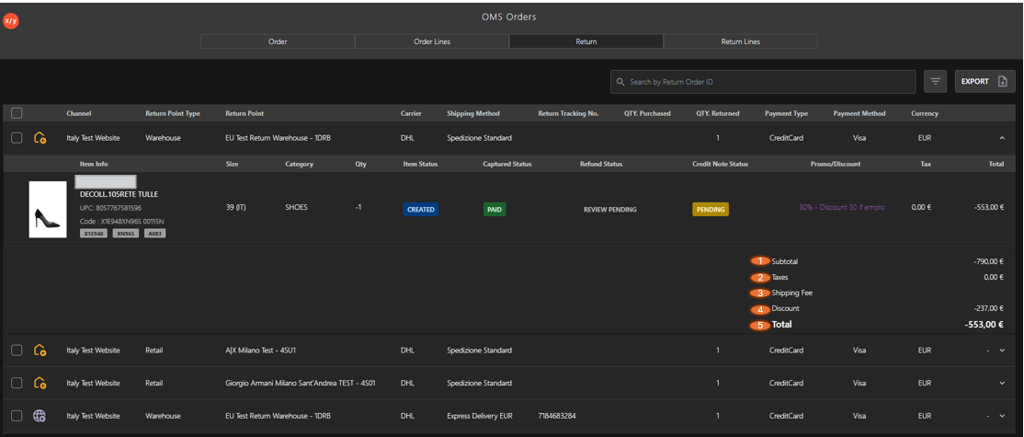
The following table describes the features that support common follow-up tasks.
| Callout ID | Feature | Description |
|---|---|---|
| 1 | Subtotal | Displays the original value of the returned item(s) before adjustments. Shown as negative to indicate reversal of the sale. |
| 2 | Taxes | Displays the tax amount associated with the return. Adjusted or reversed based on the original transaction. |
| 3 | Shipping Fee | Indicates any shipping charges applied or reversed during the return process. |
| 4 | Discount | Shows the discount applied to the order. This reduces the refundable amount and is reflected in the calculation. |
| 5 | Total | Final refund amount after applying all adjustments (subtotal, tax, shipping, and discount). Displayed as a negative value to represent money returned to the customer. |