Return Order Item Summary
Introduction
The Return Order Summary section provides an item-level overview of the return order, including product details, return location, reason for return, and financial impact. It enables users to review the returned item, validate return conditions, and understand how the refund amount is calculated. This section supports efficient return verification and decision-making during the review process.
Return Order Summary UI Reference Table
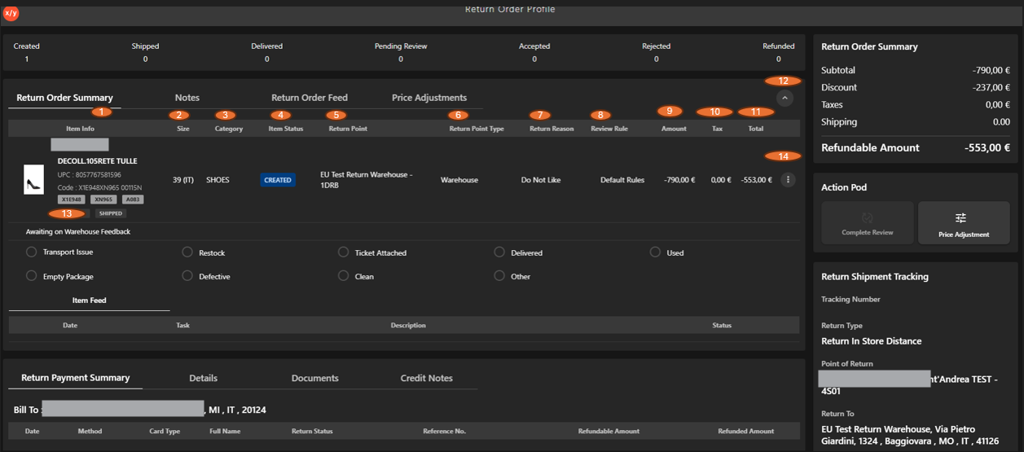
The following table describes the features that support common follow-up tasks.
| Callout ID | Feature | Description |
|---|---|---|
| 1 | Item Info | Displays product details including brand, product name, UPC, and SKU attributes. |
| 2 | Size | Indicates the size of the returned item. |
| 3 | Category | Specifies the product category. |
| 4 | Item Status | Shows the current status of the return item (for example, Created). |
| 5 | Return Point | Displays the location where the return is processed. |
| 6 | Return Point Type | Indicates whether the return is handled at a warehouse or retail store. |
| 7 | Return Reason | Shows the reason provided for the return. |
| 8 | Review Rule | Displays the rule applied for return validation. |
| 9 | Amount | Displays the base value of the returned item. |
| 10 | Tax | Shows the tax amount associated with the return. |
| 11 | Total | Displays the final refundable amount (shown as negative). |
| 12 | Expand/Collapse | Allows expanding or collapsing the section. |
| 13 | Awaiting on Warehouse Feedback | Captures inspection outcomes and item condition during return evaluation. |
| 14 | Kebab menu | Click to view additional item-level actions. |