Return Lines
Introduction
The Return Lines section displays all items associated with return orders. It provides detailed visibility into returned items, including product attributes, return quantities, and associated order references. This view enables users to track return activities, validate item details, and monitor return processing efficiently.
Return Lines UI Reference Table
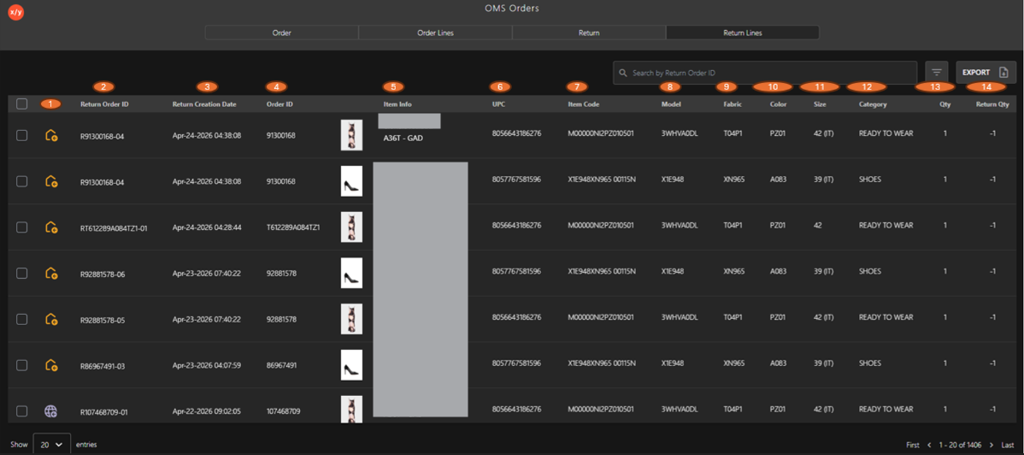
The following table describes the features that support common follow-up tasks.
| Callout ID | Feature | Functional Description |
|---|---|---|
| 1 | Return Status Icon | Indicates the source of the return (for example, online or store). |
| 2 | Return Order ID | Displays the unique identifier assigned to the return order. |
| 3 | Return Creation Date | Displays the date and time when the return was created. |
| 4 | Order ID | Displays the original order ID associated with the return. |
| 5 | Item Info | Displays the product image along with the item name and brand. |
| 6 | UPC | Displays the universal product code of the item. |
| 7 | Item Code | Displays the internal SKU used for item tracking. |
| 8 | Model | Displays the product model or style. |
| 9 | Fabric | Displays the material or fabric type of the item. |
| 10 | Color | Displays the item's color. |
| 11 | Size | Displays the item's size. |
| 12 | Category | Displays the product category. |
| 13 | Qty | Displays the quantity from the original order line. |
| 14 | Return Qty | Displays the quantity being returned (deducted from inventory). |
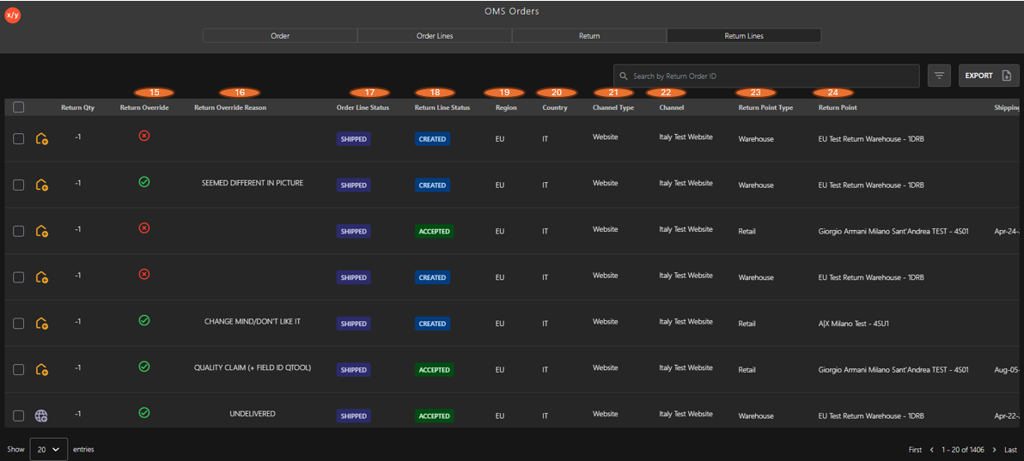
The following table describes the features that support common follow-up tasks.
| Callout ID | Feature | Description |
|---|---|---|
| 15 | Return Override | Indicates if the return was manually overridden. |
| 16 | Return Override Reason | Displays the reason for overriding the return. |
| 17 | Order Line Status | Displays the current status of the original order line (for example, Shipped). |
| 18 | Return Line Status | Indicates the current processing status of the return line (for example, Created, Accepted). |
| 19 | Region | Displays the region associated with the return order. |
| 20 | Country | Displays the country for the return order. |
| 21 | Channel Type | Indicates the sales channel type (for example, Website). |
| 22 | Channel | Displays the channel where the order was placed. |
| 23 | Return Point Type | Indicates the return location type (for example, Warehouse or Retail). |
| 24 | Return Point | Displays the name of the return location handling the item. |
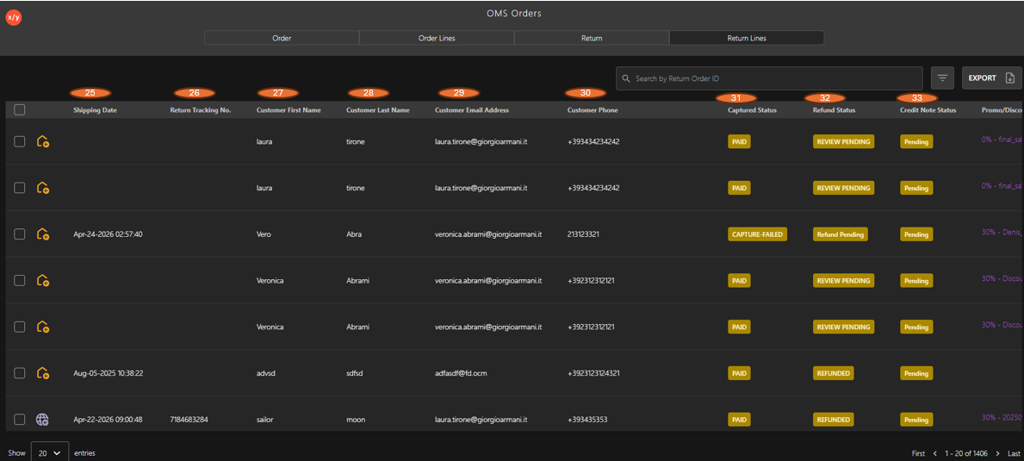
The following table describes the features that support common follow-up tasks.
| Callout ID | Feature | Description |
|---|---|---|
| 25 | Shipping Date | Displays the date and time when the return shipment is processed. |
| 26 | Return Tracking No. | Displays the tracking number for the return shipment. |
| 27 | Customer First Name | Displays the first name of the customer associated with the return. |
| 28 | Customer Last Name | Displays the last name of the customer associated with the return. |
| 29 | Customer Email Address | Displays the email address linked to the return order. |
| 30 | Customer Phone | Displays the customer's contact number. |
| 31 | Captured Status | Displays the payment capture status (for example, Paid, Capture Failed). |
| 32 | Refund Status | Displays the current refund status (for example, Review Pending, Refunded). |
| 33 | Credit Note Status | Displays the credit note status (for example, Pending). |
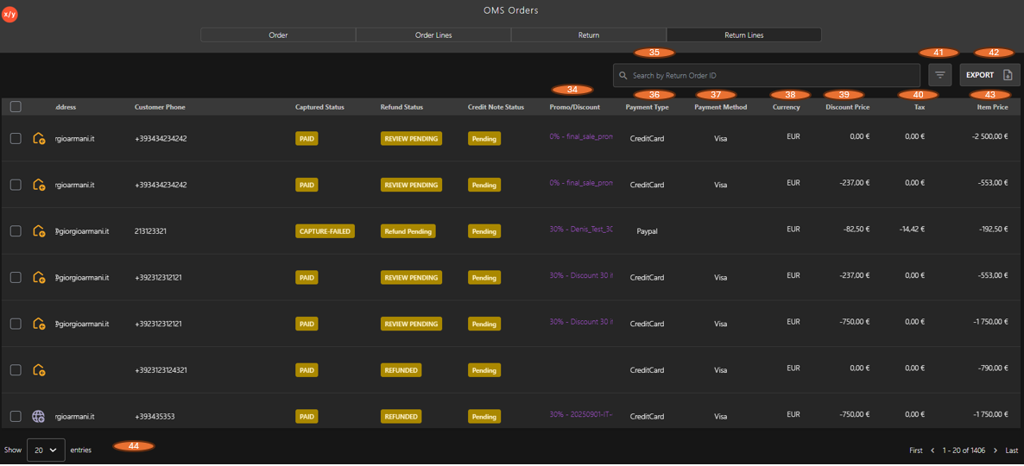
| Callout ID | Feature | Description |
|---|---|---|
| 34 | Promo/Discount | Displays the promotion or discount applied to the order. |
| 35 | Search | Allows users to search return lines using the Return Order ID. |
| 36 | Payment Type | Indicates the type of payment used (for example, Credit Card, PayPal). |
| 37 | Payment Method | Displays the specific payment provider (for example, Visa). |
| 38 | Currency | Displays the currency used for the transaction. |
| 39 | Discount Price | Displays the discount amount applied to the item. |
| 40 | Tax | Shows the tax amount applied to the item. |
| 41 | Filter | Allows users to apply filters to refine the displayed return lines. |
| 42 | Export | Enables exporting the return line data. |
| 43 | Item Price | Displays the final item price after applying discounts and taxes. |
| 44 | Pagination | Controls the number of rows displayed per page to improve readability. |