Order Status
Introduction
The Order status section provides a detailed view of an order's current stage within the fulfillment process. Tracking order status allows you to monitor the order's progress from initial placement to final delivery.
Order Status UI Reference Table
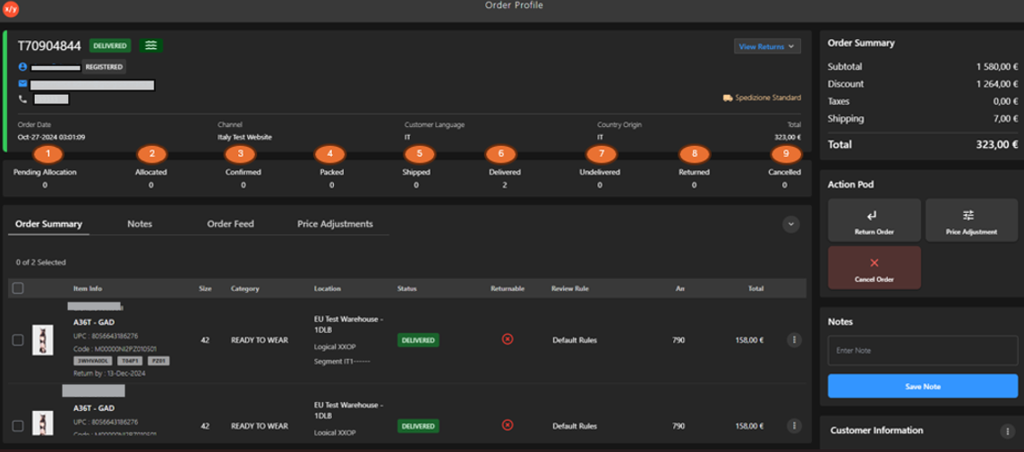
The following table describes the features that support common follow-up tasks.
| Callout ID | Status | Description |
|---|---|---|
| 1 | Pending Allocation | The order has been received but is awaiting assignment from available inventory. |
| 2 | Allocated | Inventory has been reserved for this specific order. |
| 3 | Confirmed | The order selection has been confirmed either by the customer or by the system. |
| 4 | Packed | The order has been physically located, gathered, and prepared for shipping. |
| 5 | Shipped | The order has been sent out for delivery to the designated shipping address. |
| 6 | Delivered | The order has successfully reached the destination and been received. |
| 7 | Undelivered | The order could not be delivered to the intended address, often due to an issue, such as an incorrect address. |
| 8 | Returned | The order has been sent back to the store due to issues encountered either during delivery or after delivery. |
| 9 | Cancelled | The order has been cancelled, either at the request of the customer or due to other reasons such as stock availability. |