Shipment Summary
Introduction
The Shipment Summary section displays shipment-related details for the selected order. It provides visibility into shipping method, shipment status, tracking information, and financial values to help users monitor delivery progress and verify shipment details.
Shipment Summary – UI Reference Table
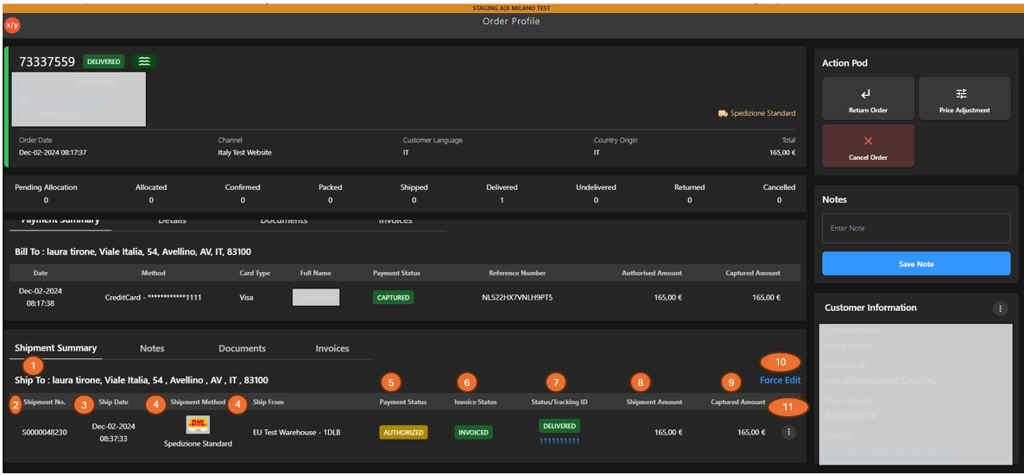
The following table describes the features that support common follow-up tasks.
| Callout ID | Feature | Description |
|---|---|---|
| 1 | Ship To | Display the delivery address associated with the shipment. |
| 2 | Shipment Number | Display the unique identifier of the shipment. |
| 3 | Ship Date | Display the date and time when the shipment was created. |
| 4 | Shipment Method | Display the shipping method used (for example, Express or Standard). |
| 5 | Payment Status | Display the payment status related to the shipment (for example, Authorized). |
| 6 | Invoice Status | Display the invoice status associated with the shipment (for example, Invoiced). |
| 7 | Status/Tracking ID | Display shipment status and tracking reference. |
| 8 | Shipment Amount | Display the total shipment value. |
| 9 | Captured Amount | Display the amount captured for the shipment. |
| 10 | Forced Edit | Click Force Edit to modify shipment details when required. |
| 11 | Kebab Menu | Click the kebab menu to view additional shipment-level actions. |