Payment Documents
Introduction
The Documents section displays invoice-related information for the selected order. It provides details such as invoice number, type, status, and associated entities to help users verify document records and financial transactions.
Payment Documents – UI Reference Table
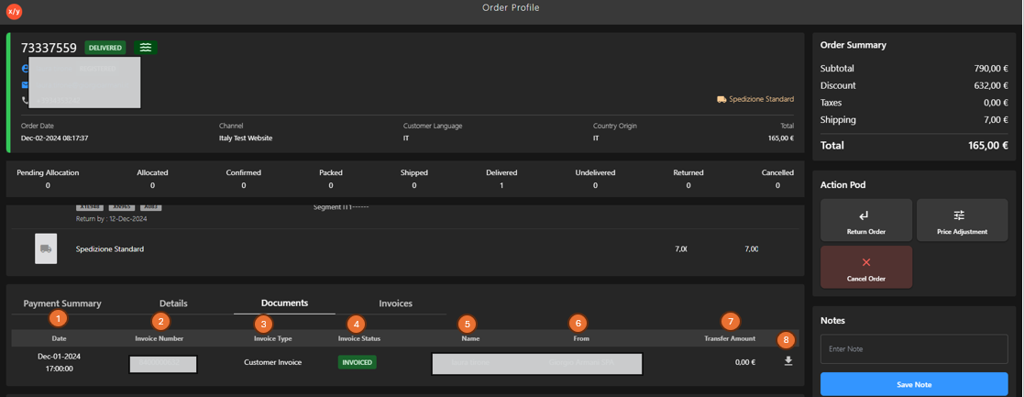
The following table describes the features that support common follow-up tasks.
| Callout ID | Feature | Description |
|---|---|---|
| 1 | Date | Display the date and time when the document was generated. |
| 2 | Invoice Number | Display the unique identifier of the invoice. |
| 3 | Invoice Type | Display the type of document (for example, Customer Invoice). |
| 4 | Invoice Status | Display the current status of the document (for example, Invoiced). |
| 5 | Name | Display the customer or entity name associated with the document. |
| 6 | From | Display the issuing entity (for example, Giorgio Armani SPA). |
| 7 | Transfer Amount | Display the amount associated with the document transaction. |
| 8 | Download PDF | Click to download the receipt document as a PDF file. |