Price Adjustment Flow
Introduction
The Price Adjustment Flow section displays the sequence of tasks involved in processing a price adjustment. It shows task status, dependencies, and execution details to help users monitor progress and identify issues.
Price Adjustment Flow – UI Reference Table
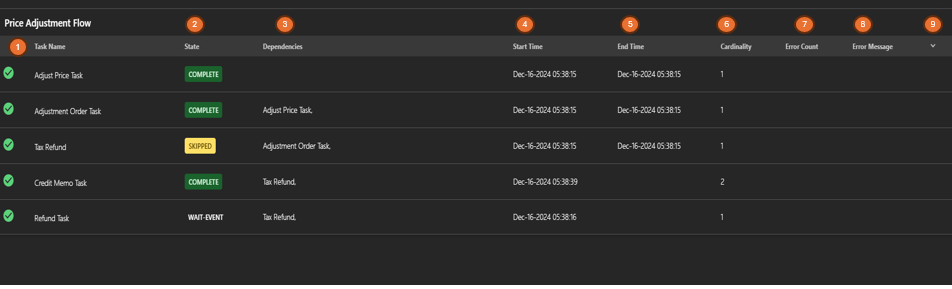
The following table describes the features that support common follow-up tasks.
| Callout ID | Feature | Description |
|---|---|---|
| 1 | Task Name | Display the name of each task in the price adjustment process. |
| 2 | State | Display the current status of the task (for example, Complete, Skipped, Wait-Event). |
| 3 | Dependencies | Display prerequisite tasks required before the current task is executed. |
| 4 | Start Time | Display the date and time when the task started. |
| 5 | End Time | Display the date and time when the task completed. |
| 6 | Cardinality | Display the number of times the task is executed. |
| 7 | Error Count | Display the number of errors encountered during the task execution. |
| 8 | Error Message | Display details of any errors related to the task. |
| 9 | Expand Row | Click to expand or collapse additional task-level details. |