Price Adjustments
Introduction
The Price Adjustments tab displays all pricing changes applied to an order. It provides a clear view of when adjustments were made, who performed them, and the resulting impact on the item price. This section helps users review discounts, corrections, and manual adjustments to ensure pricing accuracy and transparency.
Price Adjustments – UI Reference Table
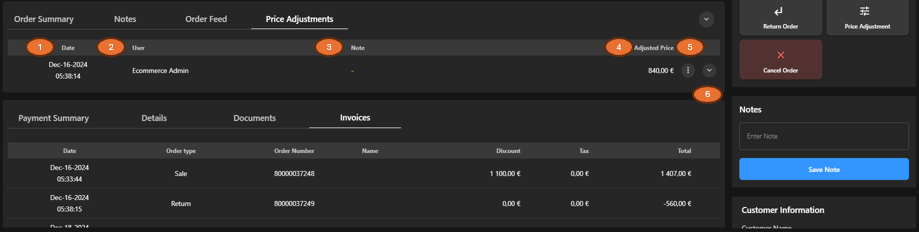
The following table describes the features that support common follow-up tasks.
| Callout ID | Feature | Description |
|---|---|---|
| 1 | Date | Display the date and time when the price adjustment was applied. |
| 2 | User | Display the user who performed the price adjustment. |
| 3 | Note | Display additional comments related to the adjustment. |
| 4 | Adjusted Price | Display the final adjusted price after applying the change. |
| 5 | Kebab Menu | Click to view additional actions related to the price adjustment. |
| 6 | Expand Row | Click to expand or collapse the row to view Order Summary. |