Order Summary
Introduction
The Order Summary tab provides a consolidated, item-level view of an order. It allows users to review ordered items and monitor the status of each order line.
Order Summary – UI Reference Table
Item Features Table
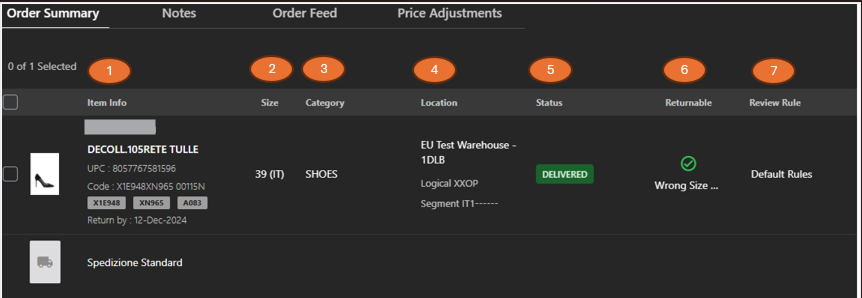
The following table describes the item features that support common follow-up tasks.
| Callout ID | Feature | Description |
|---|---|---|
| 1 | Item Info | Displays details about the item. |
| 2 | Size | Displays the dimensions of the item. |
| 3 | Category | Displays the category or type of the item. |
| 4 | Location | Displays the warehouse location where the item is currently stored. |
| 5 | Status | Displays the item's current status. |
| 6 | Returnable | Displays if the item can be returned or not. |
| 7 | Review Rule | Display applied validation or business rule. |
Item Pricing Features Table
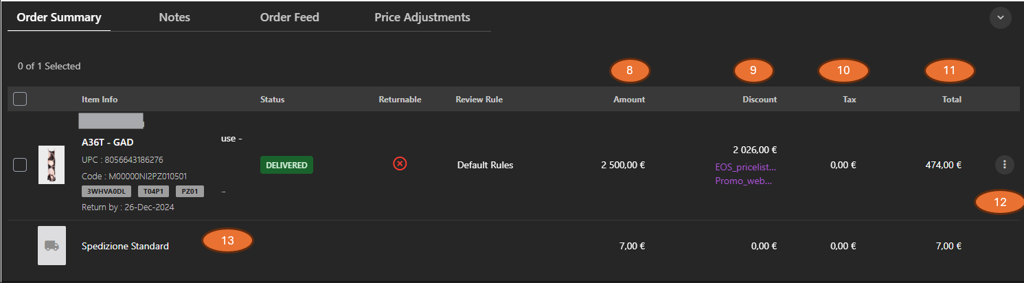
The following table describes the item pricing features that support common follow-up tasks.
| Callout ID | Feature | Description |
|---|---|---|
| 8 | Amount | Display base price of the item before discounts and taxes. |
| 9 | Discount | Display applied promotions or discounts. |
| 10 | Tax | Display tax applied to the item. |
| 11 | Total | Display final item value after all adjustments. |
| 12 | Kebab menu | Click to view additional item-level actions. |
| 13 | Additional Charges | Display extra charges such as shipping fees as separate line items. |